See what changed before the call ends
Panelytix gives independent equity research analysts and small investment teams a configurable live view of the signals that matter in an earnings call.
No spam. Unsubscribe anytime.
Request a pilot
Tell us which calls, events, or sessions you'd point Panelytix at. We set up a small number of pilots personally and reply within days.
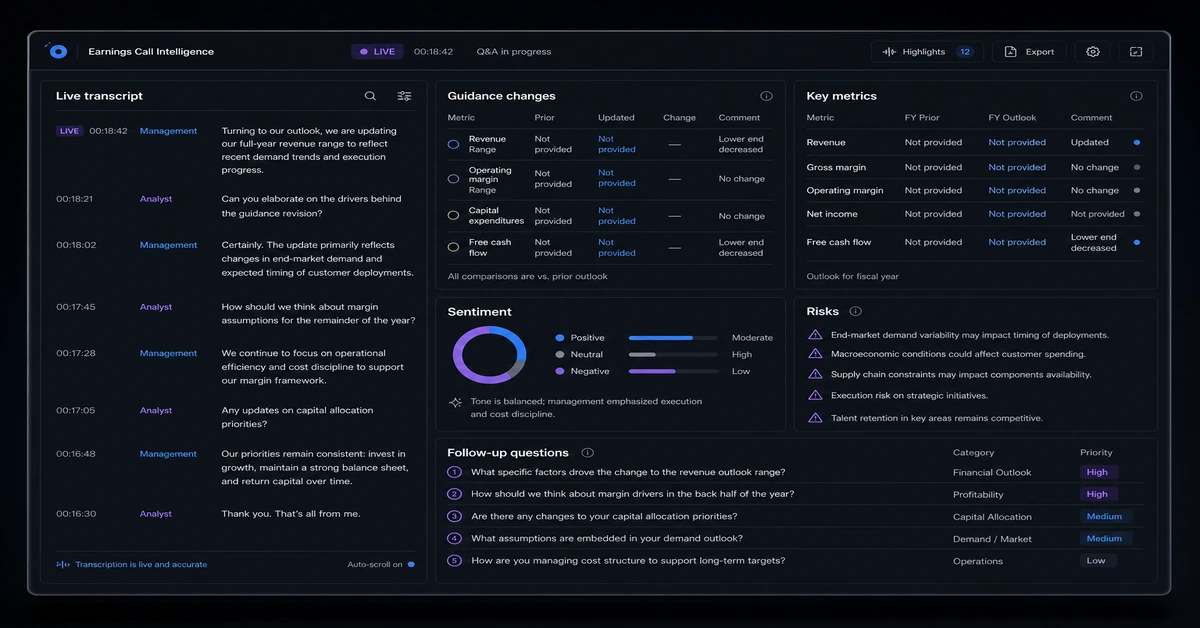
Panelytix is a live AI intelligence dashboard for independent equity research analysts and small investment teams monitoring earnings calls. It turns live call audio into an updating transcript and configurable widgets for guidance, metrics, sentiment, risks, competitor mentions, and analyst questions. Unlike transcription tools, generic BI dashboards, answer engines, or trading terminals, it is a persistent multi-widget view that surfaces signals during the call.
For equity research
Earnings-call intelligence, organized as the call unfolds
Keep guidance changes, reported metrics, sentiment, risks, and analyst follow-ups in one live workspace instead of reconstructing the call afterwards.
Panelytix turns an earnings call into a configurable live view of the changes and questions an analyst needs to investigate.
Build your earnings viewRequest a pilotFounding-analyst pilot — $99–199/mo, limited slots for the upcoming earnings season.
For macro watchers
Monitor the language and numbers that move a macro event
Compare remarks with expectations, track hawkish or dovish shifts, and keep policy flags visible while an event is still live.
Panelytix helps analysts monitor macro events with live language, expectation, and policy-context signals; it does not execute trades.
Configure a macro monitorRequest a pilotMacro event analysis
Policy event monitor
A live analytical read of the event, not trading advice.
For solo operators
A live call cockpit for the questions you need answered
Surface objections, pricing and document answers, and next steps in a view configured around your own knowledge and workflows.
Panelytix can organize your own knowledge and cross-platform context for a live call; it is not bundled meeting AI.
Design your call cockpitRequest a pilotLive call cockpit
Customer call workspace
Keep the conversation, context, and next action together.
For communications teams
See a media narrative change while coverage is still moving
Point a live press conference, broadcast, or stream at a monitor that tracks mentions, narrative shifts, notable quotes, and claim flags as they are said.
Panelytix provides a live, configurable view of mentions and narrative signals from live broadcast audio so teams can investigate changes with context.
Set up media monitoringRequest a pilotMedia narrative monitor
Narrative monitor
A readable queue of coverage signals and claims to review.
For research teams
Keep emerging themes visible during a research session
Bring emerging themes, verbatims, contradictions, and suggested probes into a live view while the session is in progress.
Panelytix helps researchers follow live session signals and identify useful probes without replacing their research judgment.
Plan a research viewRequest a pilotResearch session analysis
Research session signals
A structured read of what participants are saying now.
Live call intelligence
Follow the signals that matter
Live call transcription
Turn live earnings-call audio into an updating text stream for analysis.
Signals as the call unfolds
Refresh guidance changes, extracted metrics, sentiment, risks, competitor mentions, and analyst questions as new call content arrives.
Widgets configured for your coverage
Create an initial multi-widget call view from a plain-English analyst brief, then refine each widget's prompts.
Supporting context when you provide it
Analyse a related text stream alongside the call as supporting context.
Your coverage view
Set up for the call you monitor
Bring the call
Use the live earnings-call audio as the input for analysis.
Describe your coverage
State the signals and questions you want to follow in a plain-English analyst brief.
Follow the live view
Use the continuously updating transcript and widgets to track what management said, what changed, and what merits follow-up.
Shape your live call view
Join the waitlist for configurable earnings-call intelligence built for your coverage.